

Top 10 Google Fonts for 2023
After two years with such interest in the top Google Fonts of 2021 and Google Fonts of 2022, I feel as though this is a trend that is going to continue. So, I can't wait to show you the top fonts I've identified on Google Fonts to be an absolute trend for 2023! Will this year be the year of more transition and more risk with Google Fonts, or will we see the same fonts (Roboto, Open Sans – I'm looking at you!) time and time again? No doubt, these are solid fonts, but perhaps it's time for something fresh.
This year is different though – we have a bonus font to check out! Scroll down to the bottom to find out which font is the secret bonus font for 2023.
All the fonts on this list are available on Google Fonts, and could be great for your next web or print based design. As usual, I'll post some more common fonts, some which I think could be a great alternative / rarity, and others which are just great fun. However, these are all fonts you will eventually see on your screens in 2023, so TAKE NOTE! Be aware that these fonts are available on Google Fonts ready for you to use!
Lets take a look at some of the best Google Fonts for 2023:

What's great about all these fonts is that they all have different characteristics. Some are modern, some bold, some sans-serif, serif, variable – the list goes on. And, that's what is great about typography is how different fonts can be used to really personalise and individualise projects.
Here's my top 10 Google Fonts for 2023.
1. Unbounded
Unbounded is one of those great, highly variable wide fonts that is just so versitle and on trend at the moment. The glyphs / punctuation are great fun. Once again NaN (creator of Rubik) has hit a font right out of the park. The bolder the better for this font, I think!
2. Cormorant Garamond

Lets change direction, and take a look at this beautiful serif font in Cormorant Garamond. It should be noted that this font is inspired by Garamond, but none of the characters are traced / copied. It's all created, from hand, with Garamond being the inspiration by the fypeface. Looking at the italics, thats the font variation that interests me the most. You could really build a brand with a lot of credibility, class and dignitiy with this typeface.
3. Gothic A1

Gothic A1 looks to be that narrow, rounded font that has easy reability yet also comes across as a great blend between class / friendliness. Setting the tone with this font could be use in a headline, with a call to action, or heading text within a document. The narrow structure of the type allows for great use in tighter spaces.
4. Jura

Jura is one of those fonts for a very specific use case. Typically you'd look at using this Eurostile-type font for more technology / tech / digital / sci-fi type projects that have a futuristic element to them. Of course, while this font isnt bound to those restrictions, it is a super solid sans-serif font.
5. Prata

Another very elegant font for use on Google Fonts is Prata. WIth sharp features, yet organic looking teardrops, I'd recommend mainly using this font for headings rather than paragraph text / bodycopy. Observing the thin strokes within some of the glyphs, it is clear that this is a display-size font to use. However, pairing this font with an easy-to-read font would really allow the font to work in quiite a beautiful manner.
6. Anton

If you're looking for a slab-serif condensed font, then Anton is the one for you. Great for capturing attention / use for advertising, Anton creates a sense of urgency. Once again, I'd recommend using this one more for headlines, or a short breakout, than bodycopy / paragraph text.
7. Space Grotesk

Featured in Top Google Fonts 2022, I just had to feature Space Grotesk again. It's such a nice font at a whole range of sizes. I still love the mono inspiration it has, so it can be used in a very stastical, data-driven, technology based use case. I still think it has a place in the top 10 for 2023, because of how unique it is, and when used correctly can have a whole heap of impact.
8. Comfortaa

Rounded, geometric typefaces are very popular at the moment and Comfortaa is another one to add to your list of fonts to use for 2023. It's great to use, particularly for larger sizes, but I feel as though it scales well also for moderate headings also.
9. Nanum Myeongjo

I absolutely love this font in all sizes, but for me Nanum Myeongjo reminds me of the most typical newspaper style font. It would look like absolute dynamite on a web-based, clean, statistical or factual website with news-based articles. A beautiful, warm style sans-serif font which just has to be used in 2023.
10. Abel

Another condensed font, but this one much more flat sided. Abel is great to use for headlines and posters, yet surprisingly readable at smaller sizes due to the mono-weight. Note that this font is only available in the one weight, but that shouldn't stop you from using this as a headline and pairing with another font for more versatility.
Bonus Top Google Font for 2023
Bonus: Shrikhand

Described as 'big, bold and unapologetic', I think Shrikhand is one of those fonts that screams out to you that it needs to be read. You can totally imagine this font painted on a cafe wall or a headline for both web and print. The reason why this font is a bonus font for 2023, is because it has somewhat limited use. Not only is it only available in one weight (which is fine), the target audience for this font is somewhat restrictive. If it suits your audience, then Shrikhand is going to be a great solution.
Top 10 Google Fonts for 2023
Well, there you have it. That's my list of my top 10 Google Fonts for 2023. I love this series, and it's fantastic to be able to provide it to you once again. I'd love to know what your opinions are and if there's any fonts I've left it from Google Fonts, please let me know in the comments below.

What comes after logo design?
When operating a business, you need to consider many factors when thinking about the brand. Competition is tough, and as a business, you need to differentiate yourself from your competitors. Having a strong, recognisable brand is one of the best ways to stand out in your industry. But what does having a strong brand really mean?
Branding has always been a vital part of business, but with the virtual landscape growing, a strong branding strategy is more important than ever. Branding is a lot more than just a logo. While designing a logo for your business is a great start, what comes after? Let's walk you through the next essential steps that come after creating a logo for your business.

The Importance of Brand Strategy
The difference between your brand strategy and your brand as a whole is that your strategy is what sums up every aspect of your business like your name, logo, style, and marketing. Your overall brand strategy should emphasize the entirety of your business, the problems your business solves, and why customers should invest in you. Naturally, a brand strategy involves deeper incentives than just a great logo. Here are some ways to move your business forward after a logo design.
Create a Style Guide
When it comes to owning a business, consistency across all visuals is key. By keeping consistency, businesses can control customers' perceptions from first engagement through the buying process. A visual style guide is a way to keep branding and graphics uniform across all marketing materials. When making business essentials like a website, social media posts, or brochures, you want all visuals to match your logo. This includes graphic styles, like minimalist or abstract, color pallets, and typography. Having a style guide will give clarity to all marketing decisions made for the business.

A conclusive, usable colour scheme is an important part of a styler guide
Incorporate Branded Assets and Materials
After creating a perfect logo, as well as a style guide to help keep consistency, it’s time to make branded materials. An important branded asset any business should have is a website. Websites are your virtual front door, and it's crucial your website matches the aesthetic of your brand. Other branding essentials your business needs are printed materials like business cards, brochures, and correspondence. To portray professionalism, having formal communication correspondence will prove your business is a reliable partner.
Start Marketing Your Business
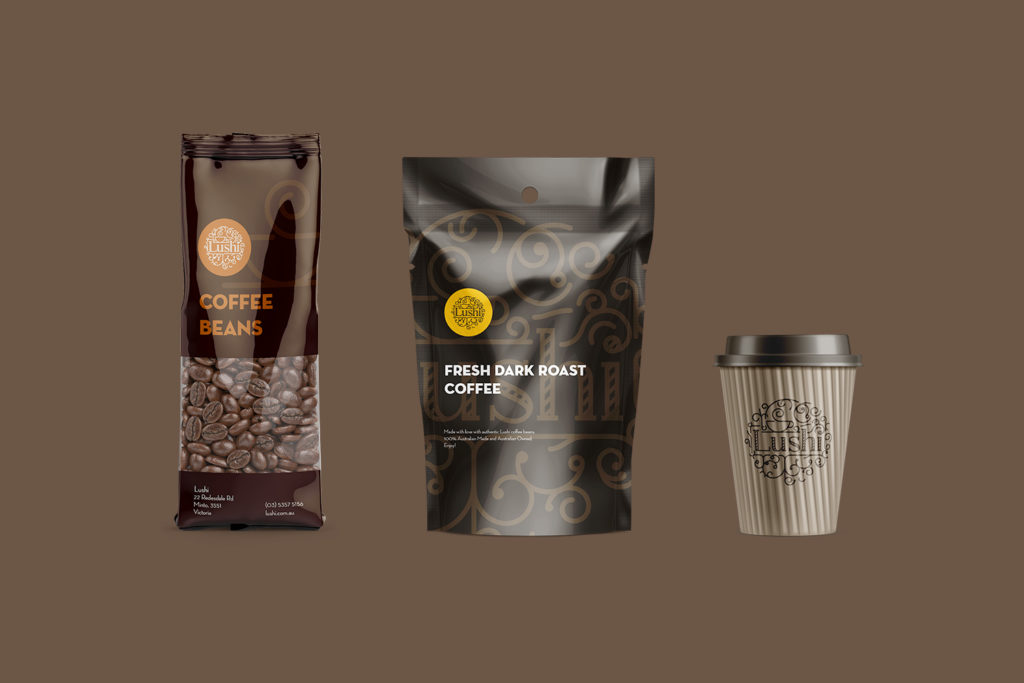
After creating a strong visual presence that truly tells the story of your brand, it’s time to start marketing your business. Having a strong marketing strategy is one of the most important aspects of getting new customers. When done correctly, marketing can be the most powerful tool to use to present your brand image to those looking to invest in your business. Utilising the branded materials in your arsenal can build brand familiarity, higher customer engagement, and authenticity with your audience.

The Origin logo incorporated into label design, with fitting typography and colour scheme.
Ready to Get Started?
If you have already worked with a designer to create a great logo, you are already on the path to success. Now it’s time to take that logo and turn it into a full-scale branding and marketing strategy to push your business forward. The more consistent your brand, the more trust your audience will have in your business! If you have any questions about what to do next, please get in contact with me!
The Benefits of QR Codes in Restaurants and Cafes
For the last decade, the world has been making a digital shift. From marketing turning digital, the boom of social media, and the further development of SEO, everyone now possess a mobile phone and they use them heavily. The digital transformation was spearheaded by the effects of COVID-19, where absolutely no one wanted to touch anything such as cash or menus.
QR codes have been around for a while, so they aren’t exactly a new creation. However, Covid’s unwanted appearance launched the QR code to its ultimate popularity and now we see them everywhere – particularly in restaurants and coffee shops. As we come out of COVID, QR codes in food centric environments have stayed. Why are they so popular in restaurants? And what are the long-term benefits of using QR codes? Continue reading for a deep dive.

What are QR Codes?
QR codes, otherwise abbreviated from “quick response” are barcodes seen on any digital platform easily scanned by a smartphone device. These codes store information in little pixels on a square grid that can be read in two directions, differentiating it from your standard barcode. QR codes can store tons of unique characters and can include information like phone numbers and websites.

QR codes were originally designed by a Japanese engineer for the automobile industry. It was made to store large pieces of information and used to track vehicles and parts as they moved through manufacturing. Despite it being originally crafted by an engineer and used to digitally lead someone from one place to another, creating a QR code is now very simple and easy to do. There are many websites you can use to create codes for whatever you need them for, like contact information or menu items at a restaurant.
The Benefits of QR Codes in Restaurants and Cafes
Since the pandemic, QR codes have held major significance in Australia. Aside from being a touchless avenue for digital traffic, QR codes have a ton of other benefits to all industries. They are the bridge between print and digital, as they are often seen on t-shirts, billboards, and brochures. This can be useful in adding a digital aspect to your printed ads for marketing.
QR codes also engage customers, and this is where they’ve been popular in restaurants and coffee shops around Australia. I know in some restaurants in Melbourne, if I want to order food at my favourite venue, it’s now generally done through a QR code on the table. If you have a QR code in your marketing efforts like a flyer, you can easily lead the customer to receive more information than what you can put on your flyer. The same goes for a restaurant menu. People love to hold a restaurant menu in their hands and look through what food and beverages they can order, but ultimately the order can now be done through a mobile device.
You can also give discounts via QR codes, leaving people to want to come back for more.
Popular Ways Restaurants and Cafes Can Use QR Codes
Menus, Ordering Food and Discounts
QR codes have become exceedingly popular within the restaurant industry after the pandemic. Restaurants can use QR codes to allow customers to order food. They can also have their menu items on a landing page so that their customers can view their menu. This saves employees time cleaning, uses resources effectively, and helps the customer find what they are looking for at their own pace. Restaurants can also offer discounts to customers using QR codes for them to scan when they come back.

In conjunction with a printed menu, a QR code for ordering tends to be the ultimate solution. Branding and visual representation of the restaurant or café can remain on a printed document and is a brilliant place for a QR code to exist, allowing the customer to scan and order exactly what they want.
Virtual Contact Information
The Covid protocol for businesses in Australia right now is to collect customer information digitally. This means refraining from using spreadsheets or any paper-based recording system. It’s encouraged to use other methods like online forms or QR codes. This makes it more sanitary as well as more efficient.
QR codes are here to stay and can be beneficial in this new digital landscape. Embrace the new and get started on making QR codes for your restaurant or café, in conjunction with that ever-so-desirable printed menu!

Top 10 Google Fonts for 2022
Want to see my Top 10 Google Fonts for 2023 instead?
If not, please continue!...
After such an amazing response for the top Google Fonts of 2021 post, I couldn't help but come up with some fonts I've identified on Google Fonts to be hits for 2022! You've probably been seeing new typographic trends on the internet already in 2022, where brands are really trying to re-establish themselves after a couple of difficult years.
All the fonts on this list are available on Google Fonts, and could be great for your next web or print based design. Some of these are literally hot off the press, recently added to Google Fonts, and some are tried and tested. Nevertheless, you'll be seeing these fonts used in the next year in brand new ways, which is really exciting for design in 2022. Also, luckily enough, these fonts are available on Google Fonts ready for use!
Ok, lets get straight to it!
What's great about all these fonts is that they all have different characteristics. Some are modern, some bold, some sans-serif, serif, variable – the list goes on. And, that's what is great about typography is how different fonts can be used to really personalise and individualise projects.
Here's my top 10 Google Fonts for 2022.
1. Syne
Syne Regular is the starting point of the family. It is quite an archetypal geometric sans-serif, giving the art center a practical asset for their daily use. When getting bolder, the typeface also gets wider, forcing radical graphic design choices. I can see this font being used widely on the web, but the Extra Bold variation really caught my attention.
2. Playfair Display

I listed in this my top Google Fonts for 2021, and it's still such a good looking typeface. This design lends itself to this period, and while it is not a revival of any particular design, it takes influence from the designs of John Baskerville and from ‘Scotch Roman’ designs. Being a large size design in the transitional genre, functionally and stylistically it can accompany Georgia for body text.
3. Mochiy Pop One

These lists always get flooded with the same sans-serif or serif fonts, but what about a fun, kids based website. Or, a website for dogs and puppies? Sometimes we just absolutely need to use something fun, full of personality, and suitable for a specific target audience. Well, Mochiy Pop One is new on Google Fonts and its well worth a look. It has traits of manga, magazine, movies and sign usage.
4. Poppins

Poppins is just going and going and going. It's standing the test of time for so many projects, and in 2022, it'll continue to be dominant on the web and in print. If you don't know where to start, Poppins is a great typeface to use. But it also is so clear and easy to read that it'll look classy and suitable at the same time.
5. Roboto Mono

This monospace addition to the Roboto type family has such nice typeface characteristics which need to be seen in use to fully understand. It's so suitable for a monospaced environment, such as source code and so on, with accentuated features to help with clarity and distinction between letterforms.
6. Eczar

The family offers a wide expressive range and the display qualities of the design intensify with corresponding increase in weight, making the heaviest weights best suited for headlines and display purpose, so if you need a solid headline, this is it!
7. Space Grotesk

This beautiful, proportional sans-serif typeface based on Space Mono is again very readable particularly at non-display sizes. It's got a little bit of that Mono look about it, so it can be used in a very stastical, data-driven, technology based use case. Take a look at this one, it's well worth a look in 2022.
8. Rubik

Yep, Rubik did feature in last years top 10 Google Fonts list and it does again for 2022. This is an absolutely beautiful typeface, in all weights. But, I particularly like the light italic variation and Medium weight for a slightly bolder look. If you haven't checked out Rubik yet, it is a must!
9. Outfit

Ok, so I've only just discovered Outfit and I really like the look of it. Super upright, perhaps similar to Poppins and Montserrat, but potentially a little bit more refined? I'm not, but I do really like it.
10. Space Mono

I love to finish on a mono font, just like I did in 2021, so lets finish with Space Mono. And, whats great about it, is that the italics are just as nice as the regular fonts included. Making an impact with the italics would go down as being something quite different, but also really nice to read and leave a lasting impression.
Top 10 Google Fonts for 2022
So, that's my list of my top 10 Google Fonts for 2022. It's great to be back again, providing my top list of fonts, which will hopefully help your next project or ust help brainstorm fresh ideas. I hope you benefit from the list! It might be a case where you want some font inspiration of what to use, or want professional advice. I'd love to know what your opinions are and if there's any fonts I've left it from Google Fonts, please let me know in the comments below.
Using QR Codes in Design in 2021
They're back! Who would have thought? QR codes seemed to be dead and burried when we needed an app to point our mobile device at, and it all become just too difficult. But now, with integration into cameras and COVID-19 bringing QR codes back from the dead, 2021 poses an interesting blend for print and web design thanks to QR codes alone! Back in 2011, QR codes were implemented in stores such as Macy's and Best Buy in the US, however consumers internet speeds were slow and they were riddled with problems. These days, we're checking into places, finding out more information about products and services in a much faster (more efficient) way.

What is a QR code?
A QR code (abbreviated from Quick Response code) is a type of matrix barcode (or two-dimensional barcode) first designed in 1994 for the automotive industry in Japan. A barcode is a machine-readable optical label that contains information about the item to which it is attached. In practice, QR codes often contain data for a locator, identifier, or tracker that points to a website or application. A QR code uses four standardized encoding modes (numeric, alphanumeric, byte/binary, and kanji) to store data efficiently; extensions may also be used.
Who is using QR codes?
According to statistics website Statistica, in the US alone, 11 million households will scan a QR code in 2020. You can only imagine that the amount of QR codes and their use will skyrocket in 2021 as it's a safe, hygenic way of finding out information. Furthermore, companies will see this as an opporunity to help market their business and track campaigns.
How can I use a QR code on my flyer or brochure?
A QR code is a perfect solution for restaurants, gyms, stores and cafes to keep track of which people enter their facility, but it can also be used very effectively in print design to redirect epople to your website. Take a flyer or brochure for example, where you have limited space on a physical medium, but now you can allow people to find more information through the use of their mobile device.

What are some clever ways of using QR codes for my business?
Here are a few great ways to use QR codes for your business:
- Use the QR code as a business card, to share information about yourself, your employer or business.
- Use the QR code to call a phone number.
- To allow people to register and gain access to your facility due to COVID-19.
- Reveal discount codes and coupons for your store.
- Follow or display a social media page.
- Add an event to a calendar.
- Connect to a stores Wi-Fi or service.
- Display your company website and gain more users.
- Generate leads, so to scan for a free trial or guide.
There are a mountain of other ways QR codes can be implemented, but that's just the tip of the iceburg.
Needless to say, QR codes are back in a big way in 2021. Embrace them!

Find PMS (Pantone) Colours in a PDF
Need help finding out just what Pantone colours are being used in an Adobe Acrobat PDF document? It might be a bit more simple than you think! You may have a pre-existing document which you don't have Illustrator or InDesign access to, but don't stress, you can still find out what spot colours are being used in a PDF document.

Using Adobe Acrobat Pro DC
For this tip, I'm going to be using Adobe's PDF software called Acrobat Pro. This is quite a powerful bit of software by Adobe which allows you to view, edit and prepare PDF documents. Colours sometimes need to be converted to be displayed on a monitor or sent to print correctly. PMS / Pantone Matching System colours are often used by companies as part of their global brand colour scheme. These are colours that are accurately replicated across the board, thanks to Pantone's forumla.
How to find out what colours are being used?
Step 1:
The first step in the process to open up Adobe Acrobat DC Pro where you'll be welcomed with their opening screen. Open up the PDF you'd like to verify the colours of, and then go up to Tools at the top left of the window.

Under the "Protect & Standardize" heading, there's an option called "Print Production". Lets click that option with the PDF we'd like to inspect already open.
Step 2:
At this point, another menu will popup. You can select your PDF if you haven't already at the top tab next to Tools. With the new popup window in view (see below), we can see what colours are being used in the Adobe Acrobat PDF document.

This window shows us all sorts of information, including what Simulation Profile is being used, what to show in terms of bleed and trim marks, but for the purpose of this tutorial what we're interested in is the Seperations part of the window.
In this example, the document has CMYK colours, and three spot plates to be printed. Pantone 425 C, Pantone 307 C and Pantone 2132 C are the three spot colours used in the document, but it also features some CMYK elements as I mentioned.
Toggle Spot Colours in a PDF
You can use your mouse to hover over the document, and the percentage of the colour will appear next to the name. This demonstrates how much of that colour is in use on that spot of the document.

We can also toggle colours, as shown above. This allows us to visually see what colours are being used and in what location. This is important, as we might not want Pantone 425 C (for example), to be a colour in the document, but can't find it's location. So, to toggle the option will allow us to see where it is used.
How to remove Pantone PMS Colours from PDF?
Pantone spot colours can be removed from a document completely, often by using Adobe Illustrator or Adobe InDesign. You can also refrain from printing certain colours of a document using Acrobat.

Top 10 Google Fonts for 2021
Thanks for the amazing response everyone! You can view the updated list for my Top 10 Google Fonts for 2022, here.
The world has absolutely changed in the last 12 months, and that can certainly create uncertainty going forward and what trends we may see for typography and fonts in 2021. These fonts, all found on Google Fonts are great to use for your next web or print based design. Some of these fonts are tried and tested, standing the test of time even in a very difficult 2020. Some are brand new, making their way onto websites, screens and print media right around the world. And, others I've felt could be standout fonts in 2021. Nevertheless, these will be popular fonts in 2021 and the beauty of them is that they can be found through Google Fonts.

What's great about all these fonts is that they all have different characteristics. Some are modern, some bold, some sans-serif, serif, variable – the list goes on. And, that's what is great about typography is how different fonts can be used to really personalise and individualise projects.
Lets take a look at my top 10 Google Fonts for 2021.
1. Rubik
Rubik is a slightly rounded sans serif font family designed by Philipp Hubert and Sebastian Fischer at Hubert & Fischer. It's beautiful in use, providing a clean and is very readable. The great thing about Rubik is that it's Variable meaning that sizing and styles are almost limitless.
2. Anton

Only available in one condensed, bold style, Anton is a re-creation of many traditional sans-serif typefaces. It's deliberately been redesigned for web use with opened counters and stems that are perfect for web. I can see this typeface being used for many projects particularly in hero images or banners to make a bold statement.
3. IBM Plex Sans

Already one of my favourite typefaces, IBM Plex Sans captures IBM's spirit and history in this unique font aimed at demonstrating the relationship between machine and mankind. Available in Sans, Sans Condensed, Mono and Serif, this typeface has so much versitility, and all varations can suit any projects needs. I feel as though we're so lucky to have this font on Google Fonts to use for projects as the quality seems a cut above a lot of other fonts.
4. Balsamiq Sans

I've been a long time user of Balsamiq Wireframes for my wireframes for web pages, so I'm so glad to see a Balsamiq Sans typeface available on Google Fonts. I can see this font taking off in 2021 and getting a lot of use, especially for the more friendly, family orientated websites or adventure websites – something that needs a calming font to allow the website to communicate effectively.
5. Playfair Display

How nice is this font? Such a lovely, presentable Google Font, Playfair Display oozes a certain amount of class needed. Very traditional in design, it's serif background stems from ink and pointed steel pens, giving it a certain historical touch. It's also a variable font which is what's needed in 2021 to hit the mark.
6. Oxygen
 Need a font for graphical user interfaces (GUI), desktops and devices? Oxygen is the perfect sans-serif font, optimised for the FreeType font rendering system. I can see this font being used in 2021 similar to Roboto or Open Sans in a big way, and with similar characteristics, theres no reason why it shouldn't!
7. Poppins

Poppins has been red hot in 2020, and it's one of my favourite Google Fonts. I can see it being hugely popular in 2021, also. It's extremely versatile, with a nice geometric edge to it. It's a style that's been extremely popular where each letterform is nearly monolinear and a beautiful typeface thanks to the Indian Type Foundary. I can't wait to use this Google Font in 2021!
8. Roboto

Roboto is the most popular font on Google Fonts 2020. And, I can see Roboto potentially holding its title in 2021. Extremely versatile, unoffensive and a really simple and easy to use sans-serif font. It's quite geometric in shape and structure with friendly and open curves. And, what's also great, is its readability at both large and small sizes. It's hard to see Roboto being used less, in fact it could be up there with the likes of Arial and Helvetica in terms of usage.
9. Space Grotesk

I can see Space Grotesk being used widely now that's it is well established. It's only a couple of years old, designed in 2018, but what I love about it is the idiosyncrasies that make this font so damn good to look at. I can see web fonts in 2021 having a bit more risk, and I think something that has most of the characteristics of a stable sans-serif, with with a quirky nature like Space Grostesk, starting to be more widely used.
10. Major Mono Display

One out of left field is Major Mono Display, a very monospaced geometric sans-serif that only comes in all-uppercase. But it's extremely playful, and would be a great choice for a quirky website especially for web-banners and used in a larger size. Would I use this Google Font on a lot of projects? Probably not. I'd be very selective in using it, but certainly if the opportunity were to come up to design a website with a lot of impact, and abstract in nature, I'd be tempted to use this in 2021 for sure.
Top 10 Google Fonts for 2021
So, that's my list of my top 10 Google Fonts for 2021. I hope you benefit from the list. It might be a case where you want some font inspiration of what to use, or want professional advice. I'd love to know what your opinions are and if there's any fonts I've left it from Google Fonts, please let me know in the comments below.

Skeuomorphic Design - UI Design Trend 2020
Welcome back Skeuomorphic Design! With the latest updates Apple has presented for iOS 14, and it's development of brand new application icon designs, you can be assured that skeuomorphic design is back for the second half of 2020.
What is skeuomorphic design?
Skeuomorphism is commonly a term used in UI design that describes objects / graphics that are similar to what you'd see in the real-world. What this entails is hyperrealistic shading and depth to the design, to make it look realistic. For example (and we all know the one), but the recycling bin icon is the perfect example showing depth when discarding unwanted files.
In contrast we've had the ever popular "flat design" which has been around for the last couple of years. Flat design refers to a design which doesn't have any depth, is one-dimensional and is created to look clean and simple. We also had the "long shadow" trend, which hung around for too long, also.
From a design perspective the skills involved in making skeuomorphic design is more intricate. It makes crafting the designs have a sense of real world lighting, which can be difficult to capture.
Flat Design vs Skeuomorphic Design – which is better?
It's difficult to say, as both design languages pose their own questions and answers. Flat design can allow for a more minimal, therefore could be considered easier to use from a user interface perspective. But, the eye-candy that skeuomorphic design can bring a sense of the third dimension and a level of realism. Needless to say, designers all over the world have discussed both trends in a huge amount of depth.
Following the iOS 14 UI Design Trend
Ok, so, with Apple's release of iOS 14m / macOS at WWDC comes a trend more towards skeuomorphic design. And, when a company as big as Apple design something 'new' (or in this case bring back the old style), we all stop and tend to follow. Flat design from a UI perspective has made designing easier for a lot of people. Lets face it, they're clean and simple and they look the part. But, how difficult is it to now skim through your phone and look for the app you're after? It's arguably more difficult now, because design is looking a little too similar across the board. Skeuomorphic design allows the eye to capture more of a design, with greater depth. Thus, we take more notice of the design, appreciate its intricacies and gravitate towards it.


What is the standard business card size in Australia?
Business card sizes differ around the world, but what exactly is the standard business card size in Australia? You can, of course have custom business card sizes, different diecuts, colours, finishes and so on. But sizing is critical in a good business card design.
What is the size of a business card?
To design the perfect business card to reflect your brand, service or profession is no easy task. They certainly need to look like a professional business card. Some considerations that I make for clients of mine are the style, imagery, font, colours, layout, finish and content.
An Australian business card standard size is 90 mm wide by 55 mm high.
As I mentioned earlier though, you can choose a different size business card. Or, is it better to go with the Australian industry standard size? What reasons are there that nearly every business card is the same dimensions, size and shape? Is it the cost of printing, the choice of the designer?
If you're interested, you can take a look at my freelance graphic design business cards to see what I created for myself. I went with silver foil, a heavy gsm stock, and graphics on one side, whilst keeping it very simple and stylistic on the other side.
What are the different business card sizes around the world?
It's important to know that business cards do differ in size around the world. That's why, when I work with a client, it's important to know where the cards will be distributed. To find out the standard size for American business card size, Europe business card size and, lets face it, every country, take a look at this article I wrote.
Business card dimensions in Australia
Business card sizes in Australia don't have to be standard in size, but the standard size is 90mm wide by 55mm high (9cm x 5.5cm) with a 3mm bleed for printing. This size allows information to be easily read yet also means the card will conveniently fit in standard wallets and business card holders in Australia.
Melbourne Business Card Printing
Because I'm based in Melbourne, I often use printers in Melbourne to print business cards. I often use Simprint Digital to print business cards for clients. I have also used Moo to print business cards – get in contact with me for 20% off you first purchase!

A quick guide to copyright for digital design
I often get asked about copyright for digital design work in Australia that I've created, and what it amounts to. I've had a read of the IP Australia website and noted content outlined on their website.
When an idea or creative concept is documented electronically (i.e. on a computer) or on paper, it is automatically protected by copyright in Australia. This includes books, music, film, sound recordings, newspapers, magazines and (in my case) artwork.
The copyright law is governed by the Copyright Act 1968 (Cth) and the Department of Communications and the Arts administers the law.
How copyright applies to code (for websites, for example).
When new software is created in the form of code, it's protected by copyright as an original literary work. The code doesn't need to be classified as original, in that nobody has written similar code before. Authors of the code need to demonstrate they've used skill and labour to create the software in question without blatently copying the code.
How to gain copyright protection
Unlike a trademark, patent or design, copyright does not require any form of registration as it is automatically generated when the work is created. This is great for designers in Australia, who have their work protected from the outset.
What copyright gives the creator
The owner of the copyright gets exclusive rights to;
- make copies of the software
- publish the software
- communicate the sotware to the general public
- make adaptations of the software
- and more!
An idea isn't protected under copyright
A specific form of expression is what is protected content, not an idea (as such). To protect functionality of software in Australia means that the copyright holder would need to apply for a patent with IP Australia.
This is just a really brief post, with some quick information regarding copyright in Australia that I thought I'd post and share on my website. As always, please visit the governing body website of your country if you're an artist not from Australia.
To find out more, please visit the IP Australia website.

Different Business Card Sizes Around the World
A business card is a great first impression and while the purpose of a business card has evolved slightly, it's now a very common distribution tool. Many business owners and employees use it as a networking tool and gone are the days of simple, one sided cards being the normal approach to the design.
While many people can't get enough of digital and online information, the business card, along with other print material is still a very commonly printed asset in many countries. And, amazingly enough, standard business card sizes are different all around the world.
So, let's have a look at the standard sizing of business cards. While the differences are only minor, it may effect your job for many reasons. Initially, it's the most important step for business card creation.
Business Card Standard Sizes around the world
I've created a table of standard business card dimensions for different countries around the world, including dimensions (width x height) and bleed dimensions – important for keeping your business card information safely within the card boundaries.
| Country | Dimensions (Width x Height) | Dimensions with Bleed |
|---|---|---|
| Australia and New Zealand | 90mm x 55mm | 96mm x 61mm |
| Argentina, Brazil, Mexico and Venezuela | 90mm x 50mm | 96mm x 56mm |
| Cambodia, Laos and Bangladesh | 90mm x 55mm | 96mm x 61mm |
| Canada | 88.9mm x 50.8mm 3.5in x 2in |
95.25mm x 57.15mm 3.5in x 2in |
| China, Hong Kong and Singapore | 90mm x 54mm | 96mm x 60mm |
| Colombia | 90mm x 50mm | 96mm x 56mm |
| Eastern Europe | 90mm x 55mm | 96mm x 61mm |
| Egypt | 87mm x 57mm | 93mm x 63mm |
| Iceland | 85mm x 55mm | 91mm x 61mm |
| India, Taiwan, Vietname and Thailand | 90mm x 55mm | 96mm x 61mm |
| Iran | 85mm x 48mm | 91mm x 54mm |
| Israel | 90mm x 50mm | 96mm x 56mm |
| Japan | 91mm x 55mm | 97mm x 61mm |
| Kazakhstan and Uzbekistan | 90mm x 55mm | 96mm x 61mm |
| Mongolia and Malaysia | 90mm x 54mm | 96mm x 60mm |
| Russia | 90mm x 55mm | 96mm x 61mm |
| Sri Lanka and South Korea | 90mm x 55mm | 96mm x 61mm |
| Scandinavia and Greece | 90mm x 55mm | 96mm x 61mm |
| Turkey | 85mm x 50mm | 91mm x 56mm |
| United Kingdom | 85mm x 55mm | 91mm x 61mm |
| United States | 88.9mm x 50.8mm 3.5in x 2in |
95.25mm x 57.15mm 3.5in x 2in |
Business Card Bleed Size
Common bleed sizes are 1/8th inch for North America, while the rest of the world is a 3mm bleed.
Business Card Dimensions and what's best for you
That should give you a better insight as to what dimensions you would like your card to be. Sometimes the standard size isn't necessarily, so it's best to discuss your job before deciding on your sizing.
If you have any further questions about business cards, please feel free to contact me for more information.