

Exhibition Space Design and Signage
Successful exhibition and event signage, and signage in general, can be a powerful tool in marketing your business at a trade show. The cost may be substantial because of the large amount of material used to produce the signage, however this would (most likely) be offset by the exposure you would gain from a successful marketing campaign.
Designing Exhibition and Event Signage for Melbourne Businesses
I’ve created exhibition signage for several companies, but two companies in particular spring to mind – both located in Melbourne. The printing process was undertaken by local companies, too, which made it easy to work in conjunction with. They also assisted with the construction of the banners themselves. The reason why that’s an asset to the process is that large format printing can be a somewhat difficult operation.
Working with the exhibition space
There’s plenty of factors that should be considered, including location of exhibition, booth location, physical space, visibility, lighting and mood of the exhibition itself. It’s important to have a stand that factors in all of those considerations. For example, demographic plays an important factor in the design of the signage because as a promotional tool, you want the target audience to appeal to what you have on display.

Signage design considerations
Viewable Angles
When working on the design for signage at exhibition spaces, it’s important to consider viewing angles. At what angles on a horizontal plane can the artwork be viewed? Will signage be cut off or obscured by additional, manmade elements such as tables, stools and chairs? How can we maximise the brand exposure on the signage itself? The logo of the business should be viewable as practically as possible.

Text and Content
Furthermore, something I always consider is average human height. When you think about signage within a booth, especially with readable elements such as text or iconography, what’s the ideal range to view the content? And, will the content be obscured by other people. Hierarchy of text also plays a role in this case, as perhaps the heading should be the reading element from a far, and subsequent text should be read up close.
Graphics and Artwork
In terms of the artwork itself that is displayed on the signage, a lot of companies want as many vibrant colours as possible to highlight their booth. This might, in fact, draw eyes to your booth, but will it be for the right reasons? You always want your branding material to reflect your product or service.
Marketing your graphics towards your specific target audience is proven to be the best way to sell product / service. Bentley, an expensive automotive manufacturer, use subtle monochromatic tones to sell their premium product. It adds to the depth and quality of their product. And, rightly so. It’s one of the most expensive cars in the world. Toyota, on the other hand, tend to use a lot more colour with a lot more vibrancy to make their product appeal to a broader, cheaper target demographic.
Additional design assets for a successful marketing campaign
Of course, it’s important to remember the other assets in conjunction with your exhibition booth signage, such as a brochure showcasing your product or service, perhaps a flyer to quickly show customers what you offer, and business cards to introduce yourself and employees. Pull-up banners are also a great way of capturing the attention of viewers with short, sharp messages or visuals. All these types of touchpoints are important to impressing potential customers. Why? Because, customers love to see professionalism, quality and most importantly be able to trust the business.

Washington Post Express Female Gender Symbol Mix-Up
Embarrassingly, Express has accidently used a male gender symbol instead of female on the cover of their paper, by The Washington Post. It was picked up on social media, where viewers spotted the mistake quickly.

Hours later, the company released an updated version of the cover with the ammended version.
They apologised in the Twitter post as shown below:
We made a mistake on our cover this morning and we’re very embarrassed. We erroneously used a male symbol instead of a female symbol.
— Express (@WaPoExpress) January 5, 2017
...and the corrected version:
This is how the cover should have looked. We apologize for the mistake. pic.twitter.com/MKKOkHPV8T
— Express (@WaPoExpress) January 5, 2017
Hopefully a corrected, re-printed version tomorrow! Everyone makes mistakes, right?

Top Company Logo Redesigns of 2016
2016 was a big year for logo redesigns with many companies changing their visual identity to something new and more visually exciting. Being such a signficant part of company's brand, it generally requires all collateral to then be changed, too. So, redesigning a logo can be difficult in order to balance traditional elements of the company with an evolution or new direction that the company is trying to portray.
These company's had mixed reviews, with some copping far more criticism than others. I'd love to know your thoughts on which you believe are successful or not!
Mastercard

Generally, the Mastercard logo redesign was positively recieved. The change in logotype, switching from an italicized, drop shadowed sans-serif look, has allowed them to fit more in-line with current trends. With the use of FF Mark now incorporated in the logo, the round, overlapping circles now have a complimentry typeface using the same geometric features. It would be interesting to see if they could have used an uppercase "M" to help balance with the lowercase "d" for some added symmetry. The thing I love most about the new logo is how brandable it is.
Kodak

Kodak's previous logo was considered a big change for the company at the time, where they went to a logotype only logo, removing the camera-shutter icon. The new logo has so many traits of the brands previous logos, that it almost feels like they've acknowledged that what they had previously, was so iconic. They have modernised the logo, with a modern typeface, but retained the flat two-colour look that they've always had. The new logo has been recieved very well, and an often frowned-upon stacked type aesthetic seems to work.
 Changing from it's retro camera logo to a multi-colour gradient was a big change for the photo-sharing mobile app. Instagram retained the view finder, but created a more vibrant, modern logo. Initially the new icon was received very poorly, with a lot of people disliking it. However, I feel that as more time passes, the majority of those would be changing their views. I feel as though it was a positive change, but I would have liked to have seen the light 'flash' gradient reversed. The only reason I believe the light source is at the bottom is for balance.
Deliveroo

A substantial change compared to the other updated logos in this list, Deliveroo retained their corporate colours, but totally changed everything about their type and symbol. From uppercase to lowercase and a full bodied kangaroo to a head, they've opted for a bolder more simple identity. It's important to note the use of the logo, often seen on bike couriers, their logo needs to be quickly identified and simple. So, a 'clip art' type look, I feel, works for them. The quirky looking kangaroo aims a more specific, younger target audience.
Premier League
The Englush Premier League have always had a soccer ball in their symbol and a very royal looking logo overall. This redesign removes the ball (and the lions body) to create a more modern and dare I say trendy looking logo. This really comes out especially in it's application during a match. And, the way it's used is very different to other sports around the world, so it is trendsetting for a sporting logo. Created by the agency who did AirBnb's latest logo, it does have some evolution with a proud, forward facing.. face. One thing to note is the colour palette which has a feeling of being a strange choice, changing from royal to something a bit more dispirited.
Uber

Quite a radical change for ride sharing company Uber, they've gone with something stylistically very different. Gone goes the professional and somewhat high-end looking logo to something a lot more geometric and introducing more colour. Uber has described their logo as inspired by the "bit" and the "atom" which are both the foundation of technology and the universe. The good thing about the redesign is that it does take away from that black car, private ride-sharing feeling to something a bit more broad and general.
That wraps up some of the significant brand changes of 2016. Other notable entries were Taco Bell, Dell, Qantas, Subway and Pandora.

Dribbble Invite Up For Grabs
Hey designers – want to become be a Baller on dribbble? I have an invite up for grabs!

I've been apart of dribbble for a while now and it's a great community to be involved in. Lots of great work on display by artists all around the world! I'm looking for someone with unique designs / artwork to become involved in the community.
Entries will close on the 26th of October.
*** Update October 2016 ***
Congratulations to Timothy Dole for winning the contest! Check our his first shot, and give him a follow! https://dribbble.com/timothydole

Personal Business Card Designs
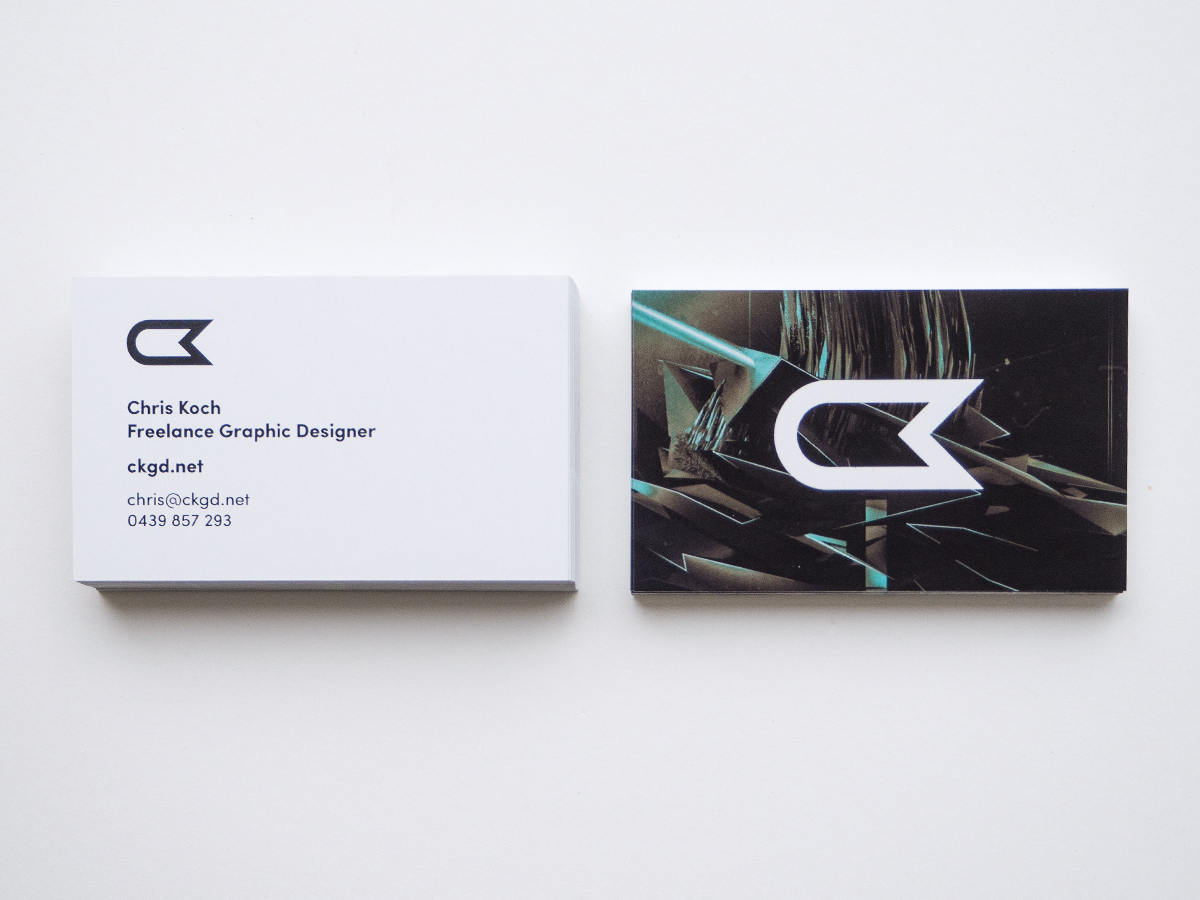
I recently made some new, modern personal business cards featuring my new logo. I thought it would be nice to make a few variations (5 in total), with the background of the back being different artwork that I've created over the years. I wanted to keep the front – where my name, phone and email address is – nice and clean. Legibility and cleanliness are two big factors, for me, for this particular side of the card.
These cards are printed on a 300gsm substrate in a standard size for Australia. I went for a gloss finish, with a laminate over the top. It allows the colours to appear rich and vibrant, even though they're generally monotone looking for the most part.
A special thanks to Simprint Digital in Dingley, Victoria, Australia for getting these printed or me. They always do a fantastic job and I'd definitely recommend them.

Above: 'Day 7' business card design featuring artwork created in Adobe Illustrator.

Above: United business card design featuring the artwork created for Desktopography.
Above: Heights business card design featuring the artwork from the Depths / Heights series.

Above: Inifinite business card design featuring artwork created in an isometric, 3D style in Illustrator.

Above: Flow business card design featuring artwork created for EvokeOne Digital Art Group.

New Logo and Website - A Graphical Insight
New Logo and Website - A Graphical Insight
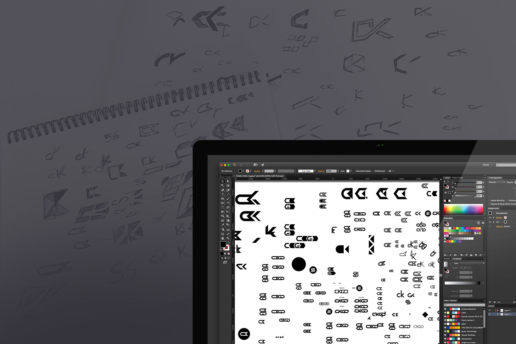
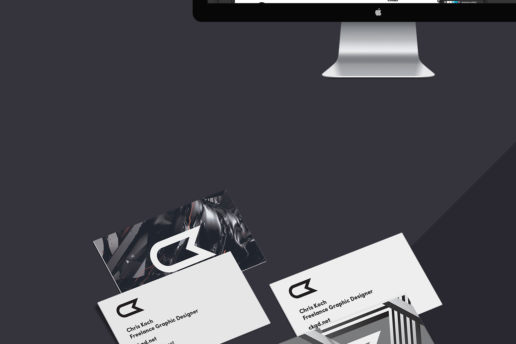
With my brand new website and logo now live, I thought it would be nice to show them both off in a graphical visual representation. This series of images allows you to see a snapshot of my personal logo design process, history of my logotype, concepts and ideas and web development.
I believe my new CK logo is an evolution of my previous logo, which is what I set out to be the case right from the beginning. The change was one, I felt, I had to make. I want to take my business in a slightly different direction and have a somewhat fresh start. The new logo is far more brandable, a bit less style specific and appeals to a wider target audience than the existing one did. As much as I liked my existing logo, I didn’t feel like I could achieve this. Furthermore, it was important for the design of the logo to be relatable and relevant to my existing design style.
Visually, I wanted it to be accurate. I considered a lot of things such as angles, line weight, visual balance and complexity. Whilst I executed a wide range of different styles, I was the most happy with this particular concept as it felt like it was me.
I’m really happy with the way its turned out and I’m super excited to start using it and adapting it to different things.
You’re welcome to ask any questions you might have about the logo design process or branding in the comments section below!




Print finishes and techniques
The possibilities of print design are almost endless these days, with technology moving so fast, you can nearly produce whatever your imagination suggests. A lot of print techniques and finishes come down to what your budget may be for the project and also what sort of finish best represents your company. So, while it might be great to have a wooden business card for example, the costs are going to be monumental. Also, does it paint a Furthermore, different cultures and countries have different specifications. I'll try and run through them all without too much jargon to make it as easy as possible to understand.
I'm going to use a business card as an example, but the guidelines are applicable to any type of print based output.
Here we go...!
Matte / Gloss Finish
The first and most common decision is whether or not the substrate should be a matte or gloss finish. Both types of finish have pros and cons associated to them, as they both alter the output in terms of colour, touch and business representation.
A gloss finish typically allows the colours of the print to lift off the page more. So, more vivid colours, darker blacks and whiter whites.
On the other hand, a matte finish will appear to absorb the colours and therefore give the product a duller, more subtle finish.
It can be argued either way as to which finish has the more 'professional' look associated to it. And, it's probably best discussed on a case by case situation.


Diecutting
A die cut is essentially a 'template' of the substrate (the material being printed on). So, for example, a business card is typically a rectangular shape, but if you wanted the business card to be cut out like a leaf or a heart, you would need a custom die cut. This can be useful to help customers remind you of your brand because of it's unique properties. A custom die cut can be used for more than just business cards, including banners, brochures, stickers and decals, labels and so on.

Rounded Corners
Typically used purely in business card design, rounded corners is a type of die cut, usually to add a touch of elegance (debatable!) to the card. They do give the card as a whole a softer look, though.

Spot UV Varnishing / Spot Varnish
Spot varnishing is relatively popular when it comes to printing. It can come in different methods including matte, silk or gloss varnish. It can be used to protect the paper for a longer and also enhance the look and feel of the design as a whole.
Spot UV is a more advanced type of varnish where it protects the cards from ultra-violet rays.

Embossing
The effect which raises or indents a particular part of the substrate is called embossing. This can be elegant, as it changes the nature of the card significantly from what is considered 'normal'. It does have one significant drawback, which if not typically desired, is that effects both sides of the substrate. Depending on the intention, this can mean that one side of the substrate isn't as usable as you'd like it to be. In turn, you've got wasted paper real estate space.


Logo Design - Typical Creation Process
Logo design always throws up all sorts of discussion. Why do some designers charge so much / little for a logo? Why does it take so long to design a logo? What are the benefits of having a logo? And so on.. Well, in this artcile, I'm going to discuss a little bit about the design process when creating a logo. We'll be discussing all sort of things from concepts to final production. Many variables come into play in the process, so I'm going to keep it as general as possible in order to try and communicate the process as best as I can. Here goes!
The Logo Design Brief
The brief is extremely important for a logo design. Mainly because what I'm about to create is the face of your company and it's important for me to know as much relevant information about the client's company as I can. So, not only is timeframe, a factor when designing a logo (or anything for that matter), but details regarding your business are just as important.
Here's a list of some areas of critical information which is extremely important in regards to logo creation:
- Business size – sole trader, micro, small, medium, large.
- Business age
- Tagret demographic – almost the most important piece of information. Who are you trying to appeal to?
- Product / service cost – who do you cater for, socio-economic wise?
- Competitors
- Budget
Initial brainstorming / sketches of the logo design
I always begin a logo design with paper, pencil and my A3 sketch book.
Generally, I'll begin with a mindmap, of sorts, or key words about the company, style of the logotype, symbol, colours I may potentially use, the mood of the logo and so on. I believe in writing down as many words to describe what I'm trying to achieve as possible, but I want the words to be accurate to the company, it's beliefs and the target audience.

For my sketches, I very rarely use an eraser, because at this point, the sketches are quite quick and purely encompass an overall style for the logo. The amount of pages I go through for a project really depends on the complexity of the brief. Sometimes it's just a page of sketches, other times 3 - 4 pages. Again, I'm happy to sketch out whatever I feel is relevant to the brief. Whether or not it's going to end up being the final final doesn't worry me at this point in time. Often I'll sketch things which I know won't even be considered, but sometimes they're the link between two very different concepts.
Execution of my sketches isn't hugely important. Some effects and techniques I'll know I can execute better on a computer when I get to that stage.
Designing a logo in Illustrator
Once I've completed my sketches, I'll jump into Illustrator and start playing with a few concepts. I sometimes bounce between my computer and sketch book, just to jot down or sketch out a new idea first. For some sketches which I've done quickly by hand, I know how they'll look digitally, but look very different in my sketchbook.
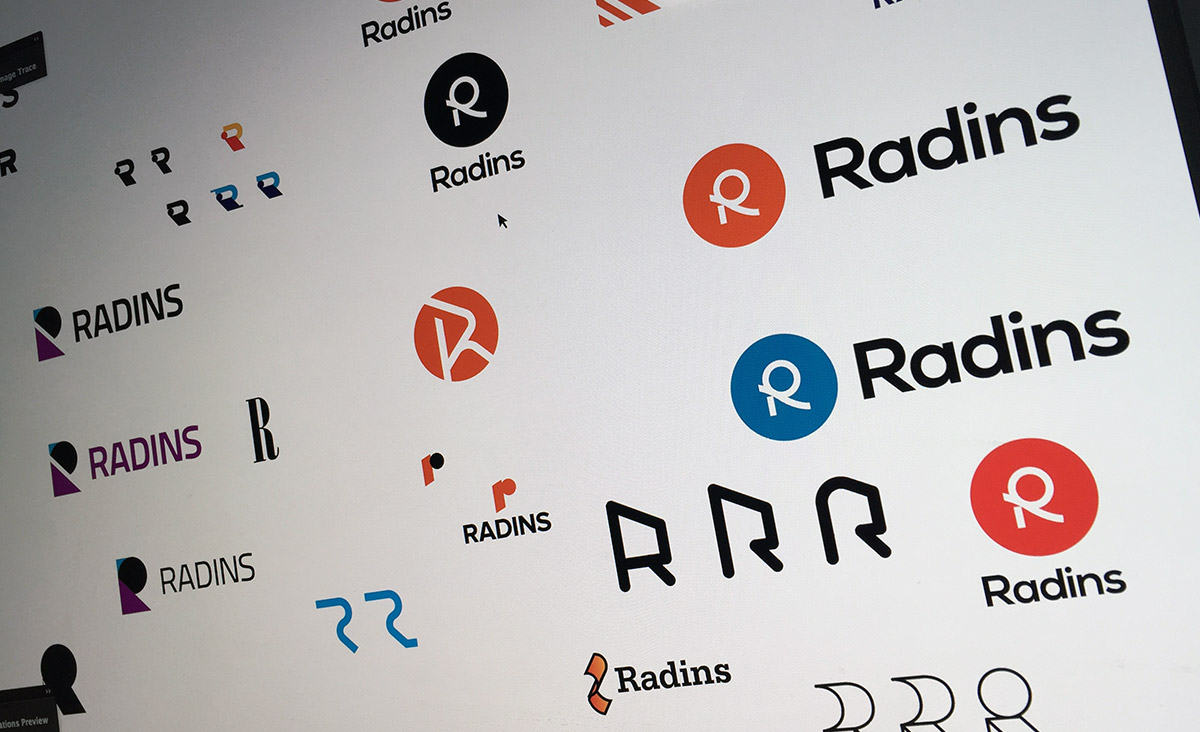
I always design my logos in Adobe Illustrator, regardless of time, who the client is and what they're going to use it for. It is the best application for creating a logo due to the tools available and the accuracy in which it can be produced. Also, as a vector file (which Illustrator handles), I know I'll be able to make the logo as big or as small as I (or the client) want to in the future. I'll begin experimenting with typography, lettering, shapes and scalability of the logo constantly. Scalability is often overlooked by designers and clients alike, as a logo might look fantastic in a large size, but when resized to a smaller size it's unreadble. Having a secondary window open at a smaller scale can also be beneficial.
It's difficult to cover all types of logos in one article, but in general it's important to use as few points as possible in the logo and make it as clean as possible. There shouldn't be any waste.

Commonly used Graphic Design Applications
When it comes to programs used by a Graphic Designer, the application choices are quite restricted. Adobe is the king when it comes to applications for the designer. They have (almost) complete market share of all things digital.
Adobe the King of Print Based Design Applications
A print based designer will heavily use programs such as Adobe Photoshop, Adobe Illustrator and Adobe InDesign for the majority of their work, typically outputting to programs like Adobe Acrobat and Distiller for PDF creation. So whether it be a poster, book, business card, letterhead and so on, these are the applications that would be used.
All of these programs cross over to a certain extent and serve a purpose throughout the design process. I know if I'm designing something for client, typically I'll use at two or three of the above programs. The reason being that some of the programs simply do a better job than others depending on the desired outcome.
Photoshop alternatives
Acorn (OSX)
Pixelmator (OSX)
GIMP (OSX, Windows, Linux)
Illustrator alternatives
Sketch (OSX)
Inkscape (OSX, Windows, Linux)
iDraw (OSX)
InDesign alternatives
Quark (OSX, Windows)
Scribus (OSX, Windows, Linux)
Lucidpress (browser-based
Web Based Graphic Design Applications
Let's switch to digital / web design for a moment. This is where Adobe doesn't have it their own way quite as much. Yes, a designer may create assets in Adobe based programs such as Photoshop and Illustrator (for website design, application design and so on) and Adobe Fireworks has it's own loyal following, but to create the website is usually done using a different app altogether. Dreamweaver (another program by Adobe) doesn't have the same strength in the coding world that other Adobe applications do in the Print world. The coder will usually have a program of choice, whether it be Coda (like I use) TextWrangler or Sublime Text for example. The choice is also restricted based on the operating system, typically Windows or OSX will dictate what applications can be used.
Hopefully that gives you a better insight as to what programs are used. This is taken from a very broad perspective, whether designers may also use specialty programs like Cinema 4D, 3D Studio Max, Quark XPress and so on, based on what they're required to do and their skillset.
Recreating a logo design in vector format
Often I'll get approached by companies asking whether or not I can recreate their logo in vector format – typically created in Adobe Illustrator (such a common program used to create vectors), for print production. This could be for stationery such as letterheads and business cards to bigger prints such as posters and even billboards. The fact of the matter is that a company needs to have generally have an EPS (Encapsulated Post Script) file in order to print their logo at different sizes.
Why the original logo wasn't created in a vector format to begin with is difficult for me to know. It may be the inexperience of the designer in creating a logo. Or, the client may not know what file format they required at the time. The most common problem is that their logo was initially designed in raster format within Photoshop (or similar) and is now in a JPG or GIF file format which is definitely not recommended.
Logo conversion from JPG / GIF to Vector (AI / EPS)
The difficulty in conversion from JPG / GIF to AI / EPS typically depends on the complexity of the logo design. The more intricate the logo, typically the more difficult the logo re-creation process. Another major factor is the quality of the scan or JPG of the logo itself. If it's unclear or low-resolution details may be lost in the conversion process. Typography can also be a challenge to trace if the original typeface isn't known or available.

You can see how pixellated a .jpg logo can be when resized. A vector logo, on the other hand, has no quality loss.
Converting a logo from photo to Vector (AI / EPS)
Another request I receive is to recreate a logo or illustration from a photograph or a scanned image.

In the example above, I've taken a photograph (left) of the logo design which needed to be printed on several more leather seats. Using Adobe Illustrator, I recreated this intricate logo (right) so the client could use the print as often as required. With the new logo now in a vector format, no quality loss will be made no matter what size the client decides to print the logo design in the future.
Why have a Vector Logo Design?
It's extremely important that a logo be created in vector format, using a program such as Illustrator (AI and EPS file formats). The logo, when created in Illustrator, then has the ability to be infinitely scaled from as small to as large as you desire.
If your company needs a new logo or if you need a logo recreated for vector, please contact me to discuss your project.